
Anúncios
Digital tape measures are revolutionizing how we take measurements in our daily lives, bringing precision and convenience right to your smartphone screen.
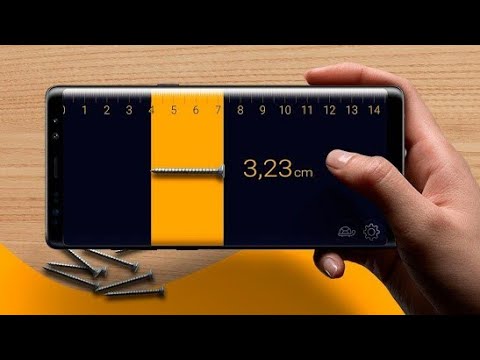


Gone are the days when you needed to carry a physical measuring tape everywhere you went. Technology has transformed our smartphones into powerful measurement tools that fit comfortably in our pockets. Whether you’re shopping for furniture, planning a home renovation, or simply need quick dimensions of an object, your phone can handle it all.
The emergence of digital tape measure apps has democratized professional-grade measuring capabilities. These applications leverage your phone’s camera and advanced sensors to deliver surprisingly accurate measurements within seconds. Let’s explore how this technology works and how you can start using it immediately.
📱 Understanding Digital Tape Measure Technology
Digital tape measures on smartphones utilize augmented reality (AR) and sophisticated algorithms to calculate distances and dimensions. When you point your camera at an object, the app uses visual reference points to determine size, length, width, and height with remarkable precision.
Modern smartphones equipped with depth sensors, LiDAR technology, or dual cameras provide even more accurate results. These hardware features create a three-dimensional map of your surroundings, allowing the app to measure multiple surfaces and objects simultaneously.
The beauty of this technology lies in its accessibility. You don’t need to understand the complex mathematics behind it—simply open the app, point your camera, and tap the screen to capture measurements instantly.

🎯 Why Choose a Digital Tape Measure Over Traditional Methods
Traditional measuring tapes certainly have their place, but digital alternatives offer compelling advantages that make them indispensable in today’s fast-paced world.
Convenience and portability stand at the forefront of benefits. Your smartphone is already with you throughout the day, eliminating the need to remember or carry additional tools. When an unexpected measuring need arises, you’re always prepared.
Digital measurements provide instant documentation capabilities. You can save measurements directly within the app, attach notes, and even capture photos with dimensions overlaid. This feature proves invaluable when shopping or planning projects that require multiple measurements.
Many digital tape measure apps offer unit conversion at the touch of a button. Switch seamlessly between inches, feet, centimeters, and meters without manual calculations. This flexibility becomes particularly useful in international contexts or when working with different measurement systems.
🚀 Getting Started: Your First Measurement in Seconds
Starting with a digital tape measure app requires minimal setup. After downloading the application from your app store, you’ll typically be prompted to grant camera permissions—essential for the app to function properly.
Most apps begin with a brief calibration process. You might be asked to scan your floor or a flat surface, helping the app understand spatial relationships in your environment. This step usually takes less than 30 seconds and significantly improves measurement accuracy.
Once calibrated, you’re ready to measure anything within view. Point your camera at the object you want to measure, and look for visual indicators on your screen—usually dots or crosses that mark measurement points.
📐 Step-by-Step Guide to Measuring Like a Pro
Taking your first measurement might feel unfamiliar, but the process quickly becomes intuitive with practice. Here’s how to achieve optimal results every time:
Step 1: Prepare your environment. Ensure adequate lighting in your space. Poor lighting conditions can compromise the app’s ability to detect edges and surfaces accurately. Natural daylight or bright indoor lighting works best.
Step 2: Stabilize your device. Hold your phone steady while measuring. Shaky movements introduce errors. Some users find it helpful to brace their elbows against their body for additional stability.
Step 3: Identify your measurement points. Tap the screen to place your first marker at the starting point of your measurement. Move your phone slowly to the endpoint, maintaining a clear view of the object.
Step 4: Complete the measurement. Tap again to set your second point. The app instantly calculates and displays the distance between the two markers. Most applications show measurements in real-time as you move your phone.
Step 5: Save or share your results. Use the app’s built-in features to store measurements for future reference or share them via messaging apps, email, or social media.
🏠 Practical Applications for Everyday Life
Digital tape measures shine in countless real-world scenarios. Understanding when and how to use them helps you maximize their potential.
Furniture shopping transformed: Before purchasing that new couch or bookshelf, measure your available space using your phone. Compare these dimensions against product specifications to ensure a perfect fit. You can even measure doorways to confirm items will pass through during delivery.
Home improvement projects: Planning to hang pictures, install shelving, or rearrange rooms? Digital measurements help you visualize layouts before committing to drilling holes or moving heavy furniture. Create accurate floor plans and spacing diagrams using captured dimensions.
Real estate and property viewing: When touring potential apartments or homes, quickly measure rooms to determine if your existing furniture will work. This capability proves especially valuable in competitive housing markets where decisions must be made quickly.
DIY and crafting: Makers and hobbyists benefit tremendously from pocket-sized measuring tools. Whether cutting fabric, building models, or creating custom projects, instant measurements streamline your creative process.
💡 Advanced Features That Elevate Your Measuring Experience
Beyond basic linear measurements, modern digital tape measure apps offer sophisticated features that extend functionality significantly.
Area calculation: Many apps can calculate the area of rectangular or irregular spaces. Simply mark the corners of a room or surface, and the app computes square footage automatically—perfect for flooring, painting, or landscaping projects.
Height measurement: Determine the height of tall objects like trees, buildings, or ceilings without climbing or extending physical tools. Point your camera at the base and top of the object, and the app does the trigonometry for you.
3D object scanning: Premium features in some applications allow you to create three-dimensional models of objects and spaces. Walk around an item while scanning, and the app constructs a digital representation complete with measurements from multiple angles.
Angle measurement: Check if surfaces are level or measure angles for construction and carpentry projects. This feature replaces traditional protractors and angle finders with digital precision.
🎓 Tips for Maximum Accuracy and Reliability
While digital tape measures are remarkably accurate, following best practices ensures consistent, reliable results.
Always measure from stable positions. Movement during measurement introduces parallax errors that affect accuracy. When possible, rest your phone on a steady surface or use both hands for support.
Measure larger objects from a distance. Standing too close to your subject can distort perspective and reduce accuracy. For best results, position yourself so the entire object fits comfortably within your camera frame.
Verify critical measurements using multiple methods. For important projects where precision matters, take several measurements and compare results. Consider double-checking with a physical tape measure when absolute accuracy is required.
Keep your camera lens clean. Smudges, dust, and fingerprints degrade image quality and interfere with the app’s ability to detect edges and reference points accurately.
Update your apps regularly. Developers continuously improve algorithms and add features through updates. Installing the latest version ensures you benefit from accuracy enhancements and bug fixes.
🌟 Choosing the Right App for Your Needs
The app marketplace offers numerous digital tape measure options, each with unique strengths and features. Understanding what to look for helps you select the perfect tool.
Consider the types of measurements you’ll perform most frequently. If you primarily need simple linear measurements, a straightforward app with minimal features might suit you best. Those tackling complex projects benefit from apps offering area calculation, 3D scanning, and annotation capabilities.
Check device compatibility and requirements. Some apps require specific hardware like LiDAR sensors (available on newer iPhone Pro models) or depth cameras. Verify that your device meets the app’s technical specifications before downloading.
Read user reviews and ratings to gauge real-world performance. Pay attention to comments about accuracy, ease of use, and reliability across different scenarios.
Evaluate the user interface. The best apps balance powerful features with intuitive design. You shouldn’t need to wade through complicated menus or instructions to perform basic measurements.
🛠️ Troubleshooting Common Challenges
Even the best technology occasionally presents challenges. Knowing how to address common issues ensures smooth operation.
Inconsistent measurements: If readings vary significantly between attempts, recalibrate your app. Poor lighting, reflective surfaces, or cluttered backgrounds can confuse detection algorithms. Improve conditions and try again.
App crashes or freezes: Close and restart the application. If problems persist, check for updates or reinstall the app. Ensure your device has sufficient storage space and processing power available.
Difficulty detecting surfaces: Highly reflective, transparent, or dark surfaces challenge camera-based measurement systems. Adding temporary reference markers or measuring from different angles often resolves this issue.
Measurements seem inaccurate: Verify your calibration status and ensure you’re following proper measuring techniques. Remember that digital tape measures typically achieve accuracy within 1-2% of actual dimensions—acceptable for most applications but potentially insufficient for precision engineering.
🌍 Measuring Anywhere: Outdoor and Challenging Environments
Digital tape measures aren’t limited to indoor use. With proper technique, they function effectively in diverse environments.
Outdoor measurements benefit from natural lighting, which often provides better illumination than indoor fixtures. However, direct sunlight can create harsh shadows and wash out your screen. Position yourself to minimize glare and maximize visibility.
Wind affects stability, particularly when measuring tall objects or working at a distance. Shield your device from breezes or wait for calmer conditions when precision matters.
Wet conditions require extra caution to protect your device. Many modern smartphones feature water resistance, but avoid unnecessary exposure. Use protective cases designed for outdoor activities if you frequently measure in challenging weather.
🔄 Integrating Digital Measurements Into Your Workflow
Maximize the value of digital tape measures by incorporating them seamlessly into your personal and professional routines.
Create measurement libraries organized by project or location. Most apps allow you to save and categorize measurements, making it easy to reference previous work.
Export data to other applications. Many digital tape measure apps integrate with note-taking software, cloud storage services, and project management tools. This connectivity enables smooth information flow across your digital ecosystem.
Share measurements with collaborators in real-time. Whether coordinating with contractors, shopping with family members, or consulting with designers, instant sharing capabilities facilitate better communication and decision-making.
🎨 Creative Uses Beyond Standard Measuring
Innovative users discover unexpected applications for digital tape measure technology that extend far beyond conventional uses.
Artists and photographers use measurement apps to calculate optimal viewing distances and frame compositions. Interior designers employ them to verify proportions and scale when selecting decorative elements.
Fitness enthusiasts track body measurements digitally, creating visual records of progress over time. Parents document children’s growth with precisely measured height records.
Travelers measure luggage dimensions to ensure compliance with airline restrictions. Shoppers verify package sizes when considering shipping costs or storage options.
📊 Understanding Measurement Accuracy and Limitations
While digital tape measures deliver impressive results, understanding their limitations prevents disappointment and ensures appropriate use.
Most smartphone-based measurement apps achieve accuracy within 1-2% under ideal conditions. This level of precision works excellently for furniture placement, rough construction estimates, and general household purposes.
However, applications requiring millimeter precision—fine woodworking, jewelry making, or mechanical engineering—still benefit from traditional precision instruments. Digital tape measures complement rather than replace specialized tools in professional contexts.
Distance affects accuracy. Measurements taken at ranges beyond 10-15 feet generally show decreased precision. For optimal results, position yourself as close as practically possible to your subject while maintaining clear visibility.
🔐 Privacy and Data Security Considerations
Digital applications that access your camera raise legitimate privacy questions. Choose reputable apps from established developers with clear privacy policies.
Review permission requests carefully. A legitimate measurement app requires camera access but shouldn’t need access to contacts, messages, or other unrelated data.
Be mindful of what appears in your camera view when measuring. Avoid capturing sensitive information or private spaces unintentionally, especially when sharing measurements with others.
🚀 The Future of Digital Measurement Technology
Measurement technology continues evolving rapidly, with exciting developments on the horizon.
Artificial intelligence and machine learning improve accuracy and expand capabilities. Future apps may automatically recognize objects, suggest optimal measurement points, and even predict dimensions based on visual analysis.
Augmented reality integration deepens, allowing users to visualize furniture in spaces before purchasing or preview renovation results with accurate scale and proportion.
Cross-device synchronization and cloud-based measurement libraries enable seamless access to your data across smartphones, tablets, and computers.
✨ Empowering Yourself With Digital Precision
Digital tape measures represent more than technological novelty—they’re practical tools that genuinely enhance daily life. By transforming your smartphone into a measurement device, you gain independence from physical tools and unlock spontaneous problem-solving capabilities.
The convenience of measuring anything, anywhere, at any time eliminates barriers between ideas and action. Whether you’re furnishing a home, pursuing creative projects, or simply satisfying curiosity, measurement capability in your pocket empowers confident decision-making.
Start exploring digital tape measure apps today. Download one of the recommended applications, practice with a few simple measurements around your home, and discover how this technology simplifies tasks you encounter regularly.
As you gain experience, you’ll find yourself naturally reaching for your phone whenever measurement needs arise. The speed, convenience, and accessibility of digital measuring tools quickly become indispensable, changing how you approach spatial challenges forever.
Embrace this fusion of technology and practicality. Your smartphone already serves countless purposes—now add precision measurement to its impressive repertoire and experience the freedom of having professional-grade measuring tools available whenever and wherever you need them. 📲
