
Anúncios
Measure Anything with Your Smartphone Camera

Start Measuring Now
Remember when measuring a room or piece of furniture meant scrambling to find a tape measure, holding one end against the wall, and hoping the numbers would stay straight long enough to write them down? Those days are officially behind us. Your smartphone—the device you’re probably holding right now—has evolved into a surprisingly accurate measuring tool that fits in your pocket and works whenever you need it. 📱
Whether you’re shopping for furniture, planning a home renovation, calculating how much paint you need, or simply settling a friendly debate about the size of something, mobile measuring technology has become incredibly accessible. You don’t need an engineering degree or technical expertise—just a smartphone and a few minutes to learn how this modern convenience works.
Why Your Phone Makes a Perfect Measuring Device
Modern smartphones are packed with sophisticated sensors originally designed for other purposes—gyroscopes for screen rotation, accelerometers for fitness tracking, and cameras for photography. Clever developers realized these same components could work together to calculate distances, heights, and dimensions with impressive accuracy.
The technology relies primarily on augmented reality (AR) frameworks built into iOS and Android operating systems. Apple’s ARKit and Google’s ARCore create a digital understanding of physical spaces by analyzing camera footage in real-time. They identify flat surfaces, track movement, and calculate depth perception—essentially seeing your environment the way you do, but with mathematical precision. ✨
What makes this approach revolutionary isn’t just the technology itself, but how seamlessly it integrates into devices we already own. There’s no additional hardware to purchase, no complicated setup process, and no learning curve steeper than taking a photograph. The barrier to entry has dropped to virtually zero.
The Simple Process Behind Mobile Measurements
Before diving into specific applications, it’s helpful to understand the basic methodology these tools employ. The process typically unfolds in three straightforward stages that take mere seconds once you’ve practiced a couple of times.
Detection and Calibration
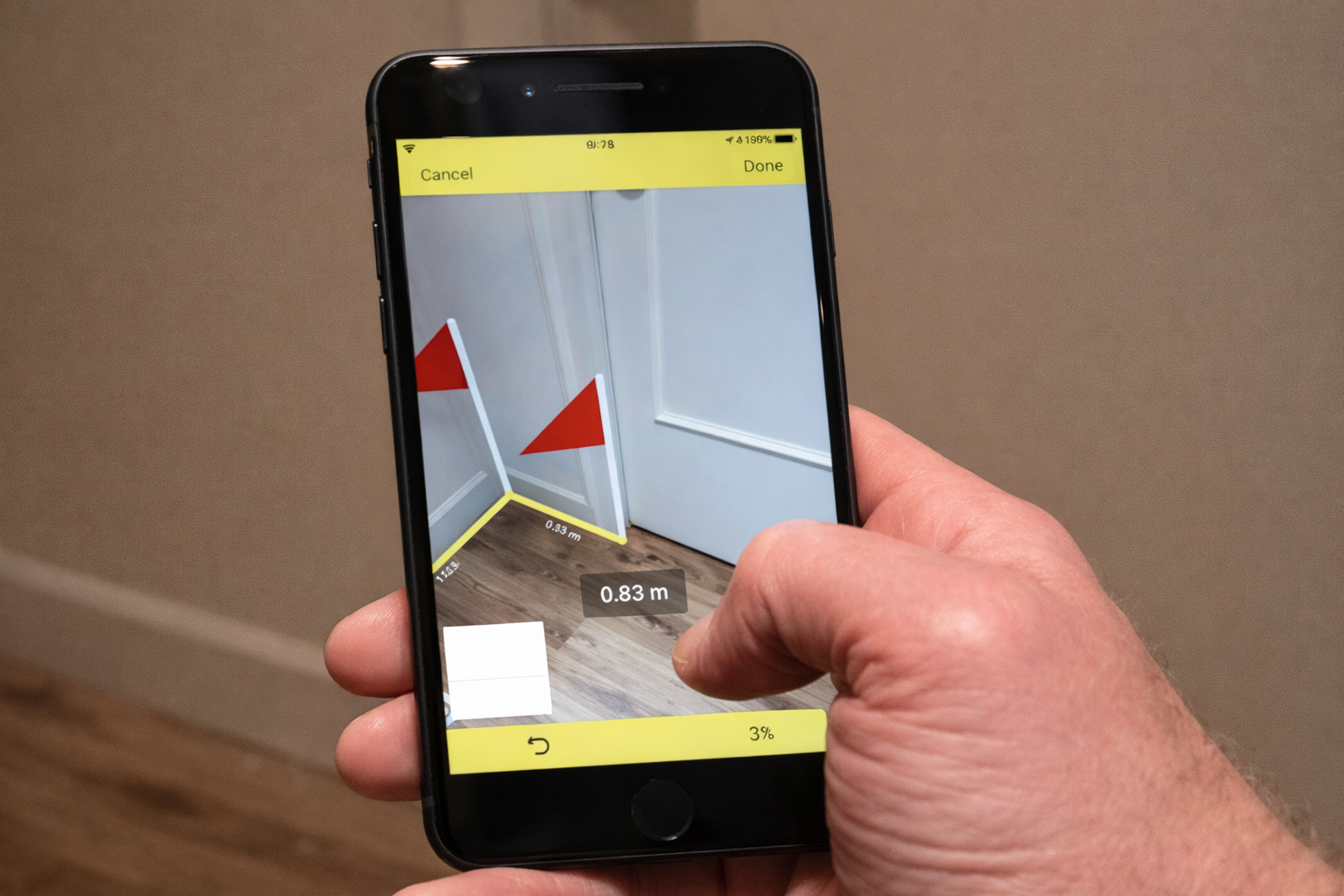
When you launch a measuring app and point your camera at a space, the software immediately begins scanning for reference points. It looks for edges, corners, and flat surfaces—anything that helps establish a three-dimensional understanding of the environment. You’ll usually see small dots or a grid overlay appear on your screen as the app “learns” the space around you. 🎯
This calibration phase typically requires you to move your phone slowly from side to side or in a gentle circular motion. This movement gives the camera multiple perspectives, allowing the software to calculate depth and distance more accurately. Think of it like your eyes working together to judge how far away something is—the phone needs that same variety of viewpoints.
Marking Points
Once calibrated, you select starting and ending points for your measurement. Most apps let you tap the screen to drop virtual pins or markers at specific locations. The interface usually displays a line connecting these points, with the calculated distance shown in your preferred units—inches, feet, centimeters, or meters.
Advanced applications allow multiple measurements in the same session, creating a network of reference lines across objects or rooms. This feature proves invaluable when measuring furniture dimensions or mapping out floor plans where you need several measurements at once.
Saving and Sharing Results
After capturing your measurements, the app typically offers options to save the data, take annotated photos, or export information to other applications. Many measuring tools integrate with note-taking apps, home design software, or shopping platforms—creating a seamless workflow from measurement to action. 💾
Step-by-Step Guide to Measuring with Your Phone
Let’s walk through a practical example that demonstrates how simple this process truly is. We’ll measure a wall to determine if a new bookshelf will fit—a common real-world scenario that traditionally required at least two hands, a tape measure, and sometimes a helper.
Preparing Your Space
Good lighting makes a significant difference in measurement accuracy. While measuring apps work in various conditions, well-lit environments with clear visibility of edges and surfaces deliver the best results. Natural daylight or bright indoor lighting works perfectly—you don’t need professional photography lights or special equipment.
Clear obvious obstacles from the area you’re measuring when possible. While apps can work around clutter, a clean view of the surface or object you’re measuring reduces confusion and improves precision. This preparation takes just seconds but noticeably improves your experience.
Launching and Calibrating
Open your chosen measuring application and grant camera permissions if prompted. Point your phone toward the wall or object you want to measure, holding it at a comfortable distance—typically arm’s length works well. The app will display instructions, usually asking you to move your device slowly to help it understand the space. 🔄
Watch for visual indicators that calibration is complete. Different apps use various signals—a grid might appear, dots might multiply, or a notification might confirm readiness. This initial phase usually takes between three and ten seconds, depending on lighting conditions and your device’s processing power.
Taking Your First Measurement
With the app calibrated, position the starting marker at one end of what you’re measuring. Most apps let you tap the screen or drag a marker into position. You’ll see a dot or pin appear in the camera view, anchored to that point in physical space even as you move your phone.
Slowly move your phone toward the other end of your measurement target. The app will draw a line following your movement, continuously calculating the distance. When you reach the endpoint, tap again to lock in the measurement. The final distance appears on screen, usually with options to adjust units or refine marker placement. 📏
For vertical measurements like wall height, the process remains identical—start at the bottom, move upward, and mark the top. The app automatically calculates vertical distance just as accurately as horizontal spans.
Capturing Multiple Dimensions
Need length, width, and height? Simply repeat the process for each dimension. Many apps keep previous measurements visible on screen, allowing you to build a complete picture of an object’s size. Some advanced features even detect rectangular objects automatically, measuring all sides simultaneously when you frame the object properly in your camera view.
This multi-measurement capability transforms complex tasks into simple ones. Measuring a room for flooring estimates that once required careful note-taking and multiple tape measure stretches now happens in under a minute with instant calculations of total square footage. 🏠
Introducing AR Measure: Your Pocket-Sized Measurement Tool
Among the numerous measuring applications available, AR Measure stands out for combining powerful functionality with remarkable ease of use. This application leverages your phone’s camera and sensors to deliver accurate measurements without requiring any technical knowledge or special skills.
AR Measure offers several measurement modes tailored to different scenarios. The point-to-point mode handles basic linear measurements—perfect for checking if furniture fits through doorways or determining wall lengths. The height mode automatically measures vertical objects from floor to top, ideal for checking ceiling heights or appliance dimensions.
Key Features That Make Measuring Effortless
The app includes a ruler mode that overlays a virtual measuring tape along edges in your camera view. This feature works wonderfully for smaller objects—measuring picture frames, boxes, or household items where precision within a fraction of an inch matters. The visual feedback feels intuitive, mimicking the experience of placing a physical ruler alongside an object. 📐
For room planning, AR Measure provides a dedicated mode that identifies floor surfaces and calculates area dimensions automatically. Point your camera at the floor, let it detect boundaries, and receive instant square footage calculations—no manual wall-by-wall measurement required. This functionality alone saves considerable time during home improvement planning.
The application remembers your measurement history, creating a library of past projects you can reference anytime. Each saved measurement includes annotated photos showing exactly what you measured, eliminating confusion when reviewing data days or weeks later. This organizational feature proves invaluable during shopping trips or contractor consultations.
How AR Measure Handles Different Scenarios
Furniture shopping becomes stress-free when you have your room measurements instantly accessible. Standing in a store looking at a sofa, you can quickly verify whether it matches your available space without second-guessing or calling someone at home. The app lets you measure the furniture right there in the showroom, comparing dimensions directly against your saved room data. 🛋️
Home renovation planning transforms from overwhelming to manageable. Measure walls for paint, floors for new covering, windows for treatments—all without juggling unwieldy measuring tapes or scribbling notes. The measurements sync with your photo library, creating a visual record alongside numerical data that helps communicate your vision to contractors or designers.
Even outdoor applications work surprisingly well. Measuring garden beds, patio dimensions, or driveway length becomes as simple as walking the perimeter with your phone. While extreme distances or poor lighting conditions may reduce precision slightly, the convenience factor for outdoor projects remains impressive.
Tips for Getting the Most Accurate Results
While measuring apps deliver impressive accuracy straight out of the box, a few simple techniques can enhance precision and reliability even further. These aren’t complicated tricks—just smart practices that work with the technology’s strengths.
Lighting and Environment Considerations
Adequate lighting remains the single most important factor for accurate measurements. The camera needs to clearly see edges, corners, and surfaces to calculate distances properly. If measurements seem inconsistent, try improving lighting before questioning the app’s capabilities. Even turning on overhead lights can make a noticeable difference. 💡
High-contrast environments work best. Measuring a white wall against white trim proves more challenging than a white wall against dark trim because the app relies on visual distinctions to identify boundaries. When measuring objects with low contrast against their background, consider positioning them against a contrasting surface temporarily.
Movement and Stability
Smooth, steady movements during calibration and measurement yield better results than quick, jerky motions. The app needs time to process visual information and update its understanding of the space. Rushing through measurements often requires repetition, ultimately taking more time than a patient, deliberate approach.
For critical measurements where maximum precision matters, use both hands to steady your phone. Resting your elbows against your body or a stable surface further reduces unwanted movement. This extra stability becomes particularly important for longer measurements where small movements can compound into larger errors. 🎯
Verifying and Adjusting
For measurements that directly impact purchases or projects, take multiple readings and compare them. The consistency across several measurements provides confidence in accuracy. If readings vary significantly, lighting conditions, movement, or obstructions might be affecting results.
Most apps allow fine-tuning marker placement after initial measurement. If a marker didn’t land precisely where you intended, drag it to the correct position rather than starting over. This adjustment capability ensures precision without frustration.
Common Uses That Simplify Everyday Life
The practical applications of mobile measuring technology extend far beyond occasional furniture shopping. Once you experience the convenience, you’ll find yourself reaching for this tool in surprisingly diverse situations. 🌟
Online shopping for home goods becomes dramatically easier when you can instantly verify dimensions. Product listings provide measurements, but visualizing whether something fits your space remains challenging. With your phone, you can measure available spaces in real-time while browsing, eliminating guesswork and reducing returns.
Moving or reorganizing becomes more efficient when you know exactly what fits where. Before the exhausting work of moving heavy furniture begins, measure doorways, hallways, and destination spaces to confirm everything will fit. This advance planning prevents the frustration of discovering mid-move that your dresser won’t fit through the bedroom door.
DIY projects and crafts benefit enormously from quick, accurate measurements. Building shelves, cutting fabric, framing artwork—countless creative endeavors require precise dimensions. Having a measuring tool constantly available in your pocket removes barriers between inspiration and creation.
Professional applications abound as well. Real estate agents measure rooms during property showings, contractors estimate material needs on-site, interior designers verify space constraints during client consultations. The technology serves both casual users and professionals seeking efficient workflows. 🏗️
Understanding Accuracy and Limitations
Modern measuring apps deliver impressive accuracy—typically within 1-2% of actual dimensions under good conditions. For most practical purposes, this precision proves more than adequate. A measurement showing 10 feet when the actual distance is 10 feet 1 inch rarely causes problems for furniture fitting or room planning.
However, these apps aren’t replacement-level tools for professional construction or engineering applications requiring sub-millimeter precision. They excel at practical, everyday measurements where convenience matters more than laboratory-grade accuracy. Understanding this context helps set appropriate expectations and use cases.
Distance affects accuracy—longer measurements accumulate slightly more potential variance than shorter ones. Measuring across a 20-foot room might show more variation than measuring a 2-foot shelf. For critical long-distance measurements, consider breaking them into smaller segments or verifying with traditional tools when absolute precision matters.
When Traditional Tools Still Make Sense
Certain scenarios still favor conventional measuring instruments. Very small objects requiring millimeter precision, professional construction work with legal liability concerns, or environments where smartphone use is impractical—these situations call for traditional approaches. 🔧
The goal isn’t replacing all measuring tools forever, but rather expanding your options. Having both digital and traditional capabilities available lets you choose the best tool for each specific situation. Most users find mobile measurements handle 80-90% of their needs, with traditional tools reserved for special cases.
Privacy and Data Considerations
A common concern with camera-based apps involves privacy and data collection. Reputable measuring applications process visual information locally on your device—the camera feed analyzes surfaces and calculates measurements without transmitting video or photos to external servers.
Review app permissions before installation. Measuring apps need camera access to function, but shouldn’t require access to contacts, messages, or other unrelated data. Stick with well-reviewed applications from established developers to minimize privacy risks. Most quality measuring apps respect user privacy while delivering excellent functionality. 🔒
The Technology That Makes This Magic Possible
Understanding the underlying technology—even at a basic level—helps appreciate how remarkable these applications truly are. Augmented reality frameworks create a three-dimensional model of your environment in real-time, identifying surfaces, calculating depth, and tracking movement through space.
Your phone’s camera captures visual information while motion sensors provide data about device movement and orientation. Software algorithms combine these inputs, using complex mathematics to translate visual patterns into spatial relationships and measurements. This processing happens instantaneously, creating the seamless experience users enjoy.
The technology continues improving with each smartphone generation. Newer devices with enhanced cameras, faster processors, and additional sensors deliver even better accuracy and reliability. Software updates bring algorithm improvements that enhance performance even on older devices—meaning the technology you access today works better than the same app would have just a year ago. 📱
Getting Started Today: Your First Measurement
You’re now equipped with everything needed to start measuring with your smartphone. The process truly is as simple as it sounds—download an app, point your camera, and tap the screen. No instruction manuals to read, no complicated setups to complete, no technical expertise required.
Start with something simple: measure the width of your desk or the height of a doorway. This first measurement takes under a minute and immediately demonstrates how the technology works. The confidence gained from that initial success makes tackling more complex measurements feel natural and approachable.
AR Measure and similar applications are typically free or offer free versions with core functionality. This zero-cost entry point removes any risk from trying the technology. Download, experiment, and discover how convenient modern measuring has become. If the free version meets your needs, wonderful—if you want advanced features, paid upgrades usually cost less than a physical tape measure. 💰
Transform How You Interact with Physical Space
Mobile measuring technology represents more than mere convenience—it fundamentally changes how we interact with and understand physical dimensions. Questions that once required effort and tools now get answered instantly. Uncertainties that delayed decisions or required return trips now resolve in real-time.
This transformation feels similar to how smartphone cameras changed photography. Professional photographers still use dedicated equipment for serious work, but billions of people now capture meaningful images daily using pocket devices. Measuring has undergone the same democratization—professional tools remain valuable for professional contexts, but everyone now has access to surprisingly capable measurement technology. 📸
Take the Next Step: Experience It Yourself
Reading about mobile measuring technology provides understanding, but experiencing it firsthand reveals its true value. The moment you successfully measure something that would have previously required finding a tape measure, you’ll appreciate how seamlessly this tool integrates into everyday life.
Don’t wait for a specific need to arise. Download AR Measure or a similar application today and spend five minutes exploring its capabilities. Measure random objects around your home—picture frames, furniture, doorways, rooms. This playful exploration builds familiarity and confidence, ensuring the tool feels natural when you genuinely need it. 🎯
Share your discovery with friends and family who might benefit from this convenience. Parents measuring for kids’ furniture, students furnishing dorm rooms, homeowners planning projects—countless people in your circle would appreciate knowing this technology exists and understanding how accessible it has become.
The future of measurement fits in your pocket, requires no special skills, and costs nothing to try. Your smartphone already possesses the hardware; you’re just one app download away from unlocking capabilities that seemed like science fiction not long ago. Take that simple step today, and transform how you interact with the physical dimensions of your world. The technology is ready—are you? 🚀
