
Anúncios
Measuring spaces and objects just got easier—no tape measure needed, just your smartphone and a simple app. 📱📏
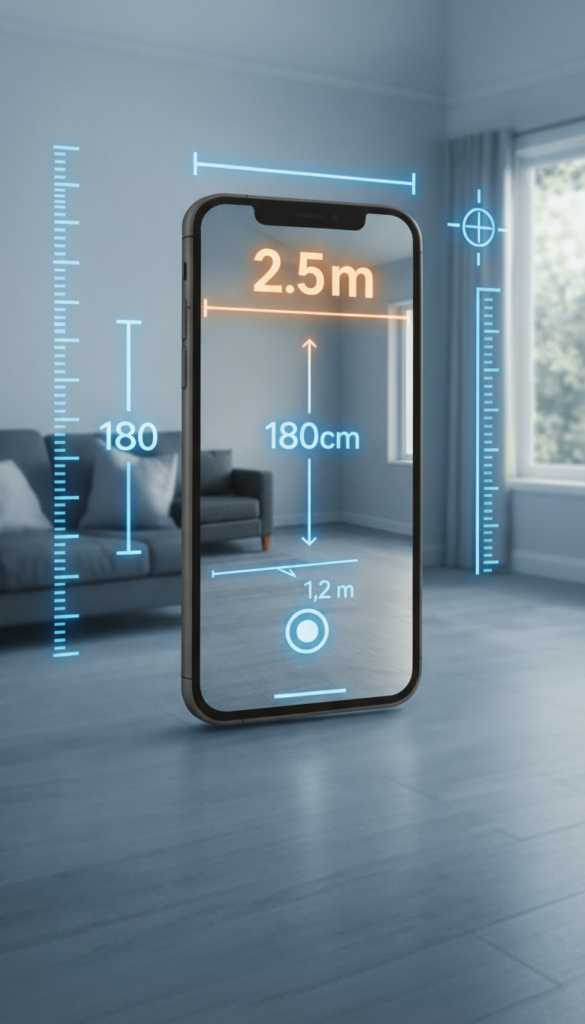


Gone are the days when measuring furniture, rooms, or even small objects required physical tools and technical expertise. Today’s smartphones come equipped with powerful sensors and cameras capable of turning your device into a precision measuring instrument. Whether you’re redecorating your living room, shopping for new furniture online, or simply curious about dimensions around you, mobile measurement apps make the process remarkably straightforward.
This technology isn’t reserved for professionals or tech enthusiasts anymore. Anyone can measure virtually anything within seconds using augmented reality and sensor-based applications. The best part? You probably already have everything you need right in your pocket. Let’s explore how to transform your smartphone into a reliable measuring tool and discover just how simple this technology has become.
Why Your Smartphone Makes an Excellent Measuring Tool 🔧
Modern smartphones pack impressive hardware that works perfectly for measurement tasks. The combination of high-resolution cameras, advanced processors, and specialized sensors like LiDAR (on newer iPhone models) or depth sensors creates an environment where accurate measurements become possible without additional equipment.
These apps use augmented reality technology to overlay digital information onto the real world through your camera viewfinder. By identifying surfaces, edges, and reference points, the software calculates distances with surprising accuracy. For everyday tasks like measuring wall dimensions, furniture sizes, or package dimensions, smartphone measurements deliver results comparable to traditional tape measures.

Getting Started: What You’ll Need 📲
Before diving into measurements, ensure you have these basics covered:
- A compatible smartphone: Most devices from the past five years work perfectly, though newer models with dedicated depth sensors offer enhanced accuracy.
- Sufficient lighting: Good illumination helps the camera identify surfaces and edges more precisely.
- Updated operating system: Keep your phone’s software current to access the latest AR capabilities.
- A measurement app: Download a reliable application designed specifically for this purpose.
- Stable hand movement: Smooth, controlled motions produce better results than quick, jerky movements.
That’s genuinely all you need. No calibration tools, no technical manuals, and no complicated setup procedures. The simplicity of smartphone measurement technology makes it accessible to everyone, regardless of technical background.
Step-by-Step: Measuring Rooms and Large Spaces 🏠
Let’s start with one of the most common uses—measuring room dimensions. This process works whether you’re planning a renovation, arranging furniture, or calculating flooring needs.
Initial Setup
Open your measurement app and grant necessary permissions for camera and sensor access. Most applications will display a brief tutorial on first launch, explaining basic gestures and controls. Take a moment to familiarize yourself with the interface—it’s usually intuitive with clear on-screen instructions.
Scanning the Space
Point your camera at the floor where you want to begin measuring. Slowly move your phone from side to side, allowing the app to detect the surface. You’ll typically see dots or grid patterns appear on screen, indicating the app has successfully recognized the plane you’re measuring.
Setting Your First Point
Tap the screen where you want your measurement to start—usually a corner or edge. A marker or dot will appear at that location. Move your phone steadily toward the endpoint while keeping the camera focused on the area. The app tracks your movement and displays a live measurement line stretching from your starting point.
Completing the Measurement
When you reach your desired endpoint, tap again to lock the measurement. The app displays the distance between both points, often with options to view in different units (feet, inches, meters, centimeters). Many applications let you save these measurements with labels for future reference.
Measuring Multiple Dimensions
For room measurements, repeat this process for each wall. Some advanced apps offer automatic room scanning, where you simply walk around the perimeter and the software creates a complete floor plan with all dimensions calculated automatically. This feature dramatically speeds up the process when measuring multiple spaces.
Measuring Objects: Furniture, Packages, and More 📦
Smaller objects require slightly different techniques but follow the same basic principles. Whether you’re measuring a table, checking if a package fits in your car, or determining cabinet dimensions, the process remains wonderfully simple.
Positioning for Accuracy
Place the object in a well-lit area with clear space around it. Position yourself so you can see the entire object or the specific dimension you need to measure. Stability matters here—resting your arms against your body or a surface helps minimize hand shake and improves measurement precision.
Identifying Edges
Modern measurement apps excel at edge detection. Point your camera at the object and slowly scan it. The software identifies edges automatically, often highlighting them with colored lines. This visual feedback confirms the app recognizes the object’s boundaries before you start measuring.
Quick Measurements
Tap your starting point, then move to the opposite end of the dimension you’re measuring. Some apps offer quick-measure features that automatically detect common rectangular objects and provide length, width, and height measurements simultaneously. This automation eliminates the need for multiple manual measurements.
Tips for Maximum Accuracy 🎯
While smartphone measurement apps deliver impressive accuracy, following these practices ensures the best possible results:
- Move slowly and steadily: Rushed movements confuse the tracking algorithms and reduce accuracy.
- Maintain good lighting: Shadows and dim conditions make edge detection harder for the camera.
- Keep the camera perpendicular: Measuring at angles introduces distortion—try to keep your phone roughly perpendicular to the surface.
- Use reference objects: Some apps let you calibrate using known dimensions, improving overall accuracy.
- Measure twice: Just like traditional methods, taking a second measurement confirms your first result.
- Avoid reflective surfaces: Mirrors and glossy materials can confuse AR tracking systems.
- Stabilize yourself: Lean against a wall or rest your elbows on a surface for steadier measurements.
Advanced Features Worth Exploring 🚀
Beyond basic linear measurements, many apps offer sophisticated features that expand their usefulness considerably.
Area and Volume Calculations
After measuring the dimensions of a space, many applications automatically calculate total area and volume. This proves invaluable for flooring projects, paint estimation, or understanding storage capacity. Instead of manual multiplication, you get instant results displayed in your preferred units.
Photo Integration
Capture photos with measurements embedded directly in the image. These annotated photos serve as perfect references when shopping for furniture, discussing projects with contractors, or planning renovations. You’ll never forget which wall was 12 feet versus 14 feet when the dimensions are right there in the photo.
3D Room Scanning
Premium apps offer complete 3D room scanning capabilities. Walk around a space while the app constructs a three-dimensional model with all measurements included. Export these models to design software or share them with professionals working on your project.
Height Measurement
Need to know how tall something is without climbing a ladder? Many apps measure vertical heights by detecting the floor and the top of an object. This works brilliantly for ceiling heights, door frames, or determining if that tall bookshelf will fit in your space.
Introducing CamToPlan: Your Pocket Measurement Solution 📐
Among the various measurement applications available, CamToPlan stands out for its user-friendly interface and comprehensive feature set. This app leverages your smartphone’s camera and sensors to deliver accurate measurements without requiring any specialized knowledge or equipment.
CamToPlan offers both camera-based augmented reality measurements and sensor-assisted calculations, providing flexibility depending on your device capabilities. The interface guides you through each measurement with clear visual indicators and simple tap-based controls that feel natural even on first use.
Key Features That Make Measuring Simple
CamToPlan includes several features designed specifically to make measurement tasks effortless:
- Instant surface detection: The app quickly identifies floors, walls, and objects, reducing setup time.
- Multiple unit support: Switch seamlessly between metric and imperial measurements.
- Measurement history: Save and organize all your measurements with custom labels and notes.
- Angle measurement: Beyond linear distances, measure angles for construction or installation projects.
- Export options: Share measurements via email, messaging, or export to other applications.
- Offline functionality: Take measurements without internet connectivity—perfect for basements or remote locations.
How CamToPlan Simplifies Your Projects
Imagine shopping for a new sofa online. Instead of guessing dimensions or rushing home to measure, simply open CamToPlan in your living room, measure the available space in seconds, and shop with confidence knowing exactly what will fit. The same applies to countless scenarios—hanging artwork, buying appliances, planning storage solutions, or determining if that vintage dresser will fit through your doorway.
The app’s straightforward approach means you spend less time figuring out how to use it and more time actually measuring. Tutorial prompts appear contextually, guiding you only when needed rather than overwhelming you with information upfront.
Real-World Applications That Save Time and Money 💡
Understanding how smartphone measurements apply to everyday situations helps you appreciate this technology’s practical value.
Home Improvement Projects
Planning a kitchen renovation? Measure cabinet spaces, appliance dimensions, and counter lengths instantly. Share these measurements with contractors or use them while browsing home improvement stores. Accurate measurements prevent costly ordering mistakes and reduce project delays.
Furniture Shopping
Online furniture shopping becomes stress-free when you know exact dimensions. Measure your space before browsing, then compare against product specifications confidently. No more returns because something was too large or awkwardly proportioned for your room.
Moving and Storage
Determine if your belongings fit in a new apartment or storage unit before signing contracts. Measure both your current furniture and the new space, eliminating unpleasant surprises on moving day. Calculate truck sizes needed based on volume measurements of your possessions.
Professional Applications
While designed for everyday users, measurement apps serve professionals too. Real estate agents document property dimensions for listings. Interior designers capture client spaces for planning purposes. Contractors provide quick estimates using on-site measurements taken in seconds rather than minutes.
Comparing Smartphone Measurements to Traditional Methods ⚖️
How do digital measurements stack up against tried-and-true tape measures?
| Aspect | Smartphone App | Tape Measure |
|---|---|---|
| Convenience | Always in your pocket | Must remember to bring it |
| Learning Curve | Minimal—intuitive interface | Simple but requires physical coordination |
| Accuracy | ±1-2% for most purposes | ±0.5% with careful use |
| Speed | Very fast, especially for multiple measurements | Moderate, slower for long distances |
| Solo Operation | Easy to use alone | Difficult for large measurements without help |
| Record Keeping | Automatic saving and organization | Manual notes required |
| Cost | Free to minimal | $5-50 depending on quality |
For everyday tasks where absolute precision isn’t critical, smartphone measurements offer compelling advantages. Professional construction projects may still warrant traditional tools, but for home use, digital measurements prove more than adequate.
Troubleshooting Common Measurement Challenges 🔍
Occasionally, you might encounter situations where measurements seem inconsistent. These troubleshooting tips resolve most issues:
Measurements Seem Inaccurate
Check your lighting conditions first. Add supplemental light if shadows dominate the scene. Ensure you’re moving slowly enough for the app to track properly—rushing is the most common cause of errors. Clean your camera lens, as smudges significantly impact AR tracking quality.
App Won’t Detect Surfaces
This typically indicates insufficient visual texture. Plain white walls or uniform floors give the camera fewer reference points. Try measuring from a different angle or add temporary visual markers like placing objects near edges to help the app identify surfaces.
Measurements Drift or Jump
Unstable tracking causes this issue. Slow your movements considerably and ensure adequate lighting. If your device lacks dedicated depth sensors, AR tracking relies entirely on visual information, making it more sensitive to movement speed and lighting conditions.
The Future of Mobile Measurement Technology 🔮
Smartphone measurement capabilities continue evolving rapidly. Newer devices incorporate dedicated LiDAR sensors that dramatically improve accuracy and work effectively even in poor lighting. As this technology becomes standard across more devices, measurement apps will deliver professional-grade results for virtually everyone.
Integration with other technologies promises exciting possibilities. Imagine measuring a room and automatically seeing furniture options from your favorite retailers placed virtually in the space, all properly scaled. Or measuring ingredients with your phone camera for precision cooking. The applications extend far beyond simple distance measurement.
Experience the Convenience Yourself 🌟
Reading about smartphone measurement technology provides understanding, but experiencing it firsthand reveals just how transformative this simple tool can be. The next time you wonder if something will fit, need to compare dimensions, or face any measurement task, reach for your phone instead of searching for a tape measure.
Download CamToPlan today and discover how effortlessly you can measure anything around you. Whether you’re tackling a home project, shopping for furniture, or simply curious about the dimensions of everyday objects, this technology puts accurate measurements literally at your fingertips. The learning curve is practically nonexistent—open the app, point your camera, and tap to measure.
Start with something simple: measure your desk, a doorway, or the wall space where you’ve been thinking about adding shelving. Notice how quick and intuitive the process feels. Then explore more complex measurements as your confidence grows. Before long, you’ll find yourself reaching for your phone automatically whenever measurement questions arise, wondering how you managed without this capability.
The technology already exists in your pocket. All that remains is activating it and experiencing the convenience firsthand. Happy measuring! 📏✨
