
Anúncios
# HTML Article:
Old photos hold precious memories, but time can damage them. Fortunately, modern technology offers powerful solutions to bring these treasures back to life.
Every family has a collection of old photographs tucked away in albums, shoeboxes, or forgotten drawers.
These images represent moments frozen in time—grandparents on their wedding day, childhood memories, or historical family gatherings. Unfortunately, printed photographs deteriorate over time, developing cracks, fading colors, stains, and other forms of damage.
The good news is that we live in an era where artificial intelligence and advanced photo editing technology can reverse decades of damage.
Apps designed specifically for photo restoration have revolutionized how we preserve family history, making professional-quality repairs accessible to everyone with a smartphone.


📸 Why Old Photos Deteriorate Over Time
Understanding why photographs age helps us appreciate the restoration process. Traditional printed photos face numerous threats throughout their existence, and each type of damage requires specific attention during restoration.
Physical damage occurs from handling, folding, or improper storage. Creases and tears develop when photos are bent or stored in tight spaces. Water damage creates stains and warping that distort the original image.
Exposure to sunlight causes fading, particularly affecting color photographs where certain pigments disappear faster than others.
Chemical deterioration happens even when photos sit untouched. The paper and chemical compounds used in photo development break down naturally over time.
This process accelerates in humid environments or when photos contact acidic materials like certain cardboard or plastic sleeves.
Color shifts represent another common problem, especially in photos from the 1960s through 1990s. The dyes used in color photography weren’t designed for long-term stability, causing images to take on yellow, red, or magenta tints as they age.
🤖 How AI-Powered Photo Restoration Works
Modern photo restoration apps leverage artificial intelligence to perform repairs that once required hours of manual work from professional editors. The technology analyzes damaged photos and intelligently reconstructs missing or deteriorated elements.
Machine learning algorithms train on millions of images, learning patterns about how faces, landscapes, and objects should appear.
When processing your damaged photo, the AI identifies problems like scratches, stains, or faded areas, then generates appropriate repairs based on surrounding context.
The restoration process typically involves several automated steps. First, the app scans the image to detect damage types and severity. Next, it applies appropriate fixes—removing scratches, enhancing faded areas, correcting color casts, and sharpening blurred details.
Advanced apps can even colorize black-and-white photos by predicting realistic color schemes.
What makes these apps remarkable is their speed and accessibility. Tasks that professional restorers charged hundreds of dollars to complete now happen in seconds on your phone.
The AI doesn’t just apply generic filters; it makes contextual decisions based on the specific content of your photograph.
✨ Key Features to Look for in Restoration Apps
Not all photo restoration apps offer the same capabilities. When choosing an app to revive your precious memories, certain features make a significant difference in the quality of results.
Automatic damage detection saves time by identifying problems without manual input. The best apps recognize scratches, tears, stains, fading, and color issues automatically, then apply appropriate corrections.
Manual adjustment tools provide control when automatic results need refinement. Look for apps offering brightness, contrast, and saturation controls, along with tools for targeted repairs on specific areas.
Colorization capabilities transform black-and-white photos into full-color images. While this feature uses AI predictions rather than capturing original colors, modern algorithms produce surprisingly realistic results.
Face enhancement technology specifically improves portrait quality by sharpening facial features, removing blemishes, and clarifying details that blur with age.

High-resolution output ensures restored photos maintain quality when printed or enlarged. Check that your chosen app exports at sufficient resolution for your intended use.
Batch processing allows restoration of multiple photos simultaneously, saving considerable time when working with large collections.
🔧 Step-by-Step Guide to Restoring Your Photos
Restoring old photographs with modern apps follows a straightforward process, though taking the right approach ensures better results.
Start by digitizing your physical photos properly. Use a scanner if available, as scanners capture higher quality than phone cameras.
When scanning, choose at least 300 DPI (dots per inch) for standard-sized photos, or higher for images you plan to enlarge. If using your phone camera, ensure good lighting without glare, hold the camera parallel to the photo, and capture at your phone’s highest resolution.
Once digitized, launch your restoration app and import the image. Most apps guide you through their process, but understanding basic steps helps you make informed choices.
Begin with automatic restoration features. These AI-powered tools handle most common issues quickly. Review the automatic results before applying additional adjustments, as they often resolve multiple problems simultaneously.
Apply manual corrections where needed. Zoom in to inspect details, checking for areas the automatic process missed or over-corrected. Use healing or clone tools to address remaining scratches or blemishes. Adjust color balance if the photo still shows unwanted tints.
Enhance overall quality with sharpening and clarity adjustments. Be conservative with sharpening to avoid creating unnatural halos around edges. Adjust brightness and contrast to restore the photo’s original visual impact.
Save your work in the highest quality format available. If the app offers multiple formats, choose JPEG at maximum quality or PNG for lossless compression. Keep both original scans and restored versions for future reference.
🎨 Colorizing Black-and-White Memories
Adding color to black-and-white photographs represents one of the most dramatic restoration capabilities. While purists debate whether colorization alters historical authenticity, it undeniably brings new life to old images.
AI colorization analyzes grayscale values and image content to predict appropriate colors. The algorithms recognize common objects—grass, sky, skin tones—and apply historically accurate color palettes.
Advanced systems even consider the era when the photo was taken, using period-appropriate colors for clothing and surroundings.
Results vary based on image quality and content. Photos with clear details and good contrast colorize more successfully than blurry or heavily damaged images. Portraits typically achieve excellent results because AI models train extensively on facial features and skin tones.
Some apps allow manual color adjustments after automatic colorization. This feature proves valuable when the AI makes incorrect assumptions—for instance, coloring a vintage car the wrong shade or misinterpreting fabric patterns.
When colorizing family photos, consider consulting older relatives about original colors. They might remember that grandma’s favorite dress was blue, not the green the AI predicted, allowing you to make corrections for historical accuracy.
💡 Tips for Best Restoration Results
Achieving professional-quality results from restoration apps requires more than just pressing buttons. These practical tips help you maximize the potential of your chosen application.
Start with the best possible scan or photograph of the original. Quality input directly affects output results. Clean physical photos gently with a soft, dry cloth before scanning to remove dust without causing damage.
Work non-destructively whenever possible. Save progressive versions as you make changes, allowing you to backtrack if an adjustment doesn’t work out. Many apps offer history or undo features—use them liberally while experimenting.
Less often means more with adjustments. Aggressive corrections create unnatural-looking results. Apply changes gradually, checking their impact before adding more. It’s easier to increase an effect than to fix over-processing.
Pay special attention to skin tones in portraits. Human eyes immediately detect unnatural skin colors, so take extra care when adjusting colors or removing damage from faces. Use dedicated face enhancement tools when available.
Compare before and after versions frequently during the restoration process. This practice helps you maintain perspective on overall improvements and prevents over-editing that strays from the photo’s original character.
Process photos in batches with similar characteristics. If you’re restoring multiple photos from the same era or album, they likely share similar damage patterns. Once you develop an effective workflow for one, apply it to others for consistency.
🏆 Comparing Professional vs. App-Based Restoration
Understanding when apps suffice and when professional services prove necessary helps you make informed decisions about your photo restoration projects.
Professional restorers bring expertise and artistic judgment that AI cannot fully replicate. They make nuanced decisions about reconstruction, work with severely damaged photos requiring extensive manual repair, and provide archival-quality results for historically significant images.
However, professional restoration costs between $50 to $500+ per image depending on damage severity and desired quality. Turnaround times range from days to weeks, and many restorers require physical delivery of original photos.
Restoration apps offer immediate results at minimal cost—most apps are free or require modest subscriptions. They handle common damage types effectively, process unlimited photos, and work directly from your phone without shipping precious originals.
Apps excel for family photos with typical age-related damage: fading, minor scratches, color shifts, and moderate deterioration. They’re ideal when you need to restore multiple images or want quick results for digital sharing.
Consider professional services for irreplaceable historical documents, severely damaged photos requiring extensive reconstruction, images with significant portions missing, or when you need museum-quality archival prints.
Many people adopt a hybrid approach: using apps for most family photos while investing in professional restoration for a handful of particularly significant or damaged images.
📱 Preserving Photos After Restoration
Restoration represents just the first step in protecting your family’s visual history. Proper preservation ensures these memories remain accessible for future generations.
Create multiple digital backups of restored photos. Store copies in at least three locations: your device, an external hard drive, and cloud storage. This three-location strategy protects against device failure, physical disasters, and other data loss scenarios.
Organize files systematically with clear naming conventions. Include dates, locations, and subjects in filenames when known. Create folder structures that make sense for your collection—organize by decade, family branch, or event type.
Consider printing restored photos on archival-quality paper. Digital files provide accessibility, but physical prints offer tangibility and visibility. Display favorites in acid-free frames with UV-protective glass to prevent new damage.
Share restored photos with family members through cloud albums or digital sharing platforms. This distribution not only brings joy but creates additional backups and allows relatives to identify unknown subjects or add context about when and where photos were taken.
Store original physical photos properly even after digitization. Use archival-quality sleeves and albums in climate-controlled environments. Never assume digital copies eliminate the need to preserve originals—they remain valuable historical artifacts.
🌟 Bringing Family History to Life
Photo restoration transcends technical improvements—it reconnects us with our heritage.
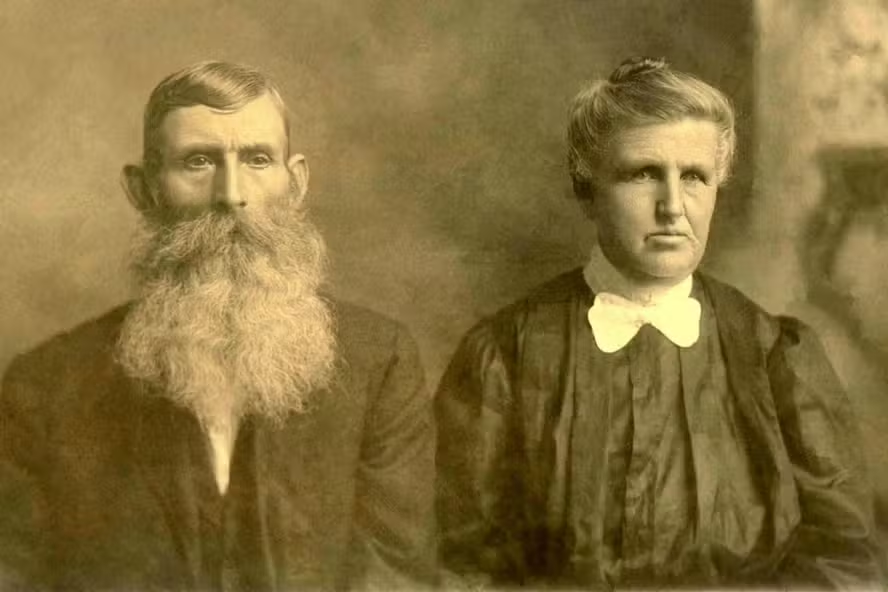
When you restore a great-grandparent’s portrait or recover a faded childhood memory, you’re preserving more than images. You’re maintaining family stories, cultural history, and personal identity across generations.
Restored photos spark conversations that might not otherwise happen. Sharing a colorized portrait of ancestors with elderly relatives often triggers stories and details you’ve never heard.
Younger family members develop stronger connections to their heritage when they can clearly see the faces of those who came before.
The emotional impact of seeing a damaged photo transformed into a clear, vibrant image cannot be overstated. What was once a barely recognizable blur becomes a window into the past, revealing expressions, details, and moments that seemed lost forever.
Modern restoration apps democratize this process, making it accessible to everyone regardless of technical skill or financial resources. You don’t need expensive software or professional training to give your family’s memories a second life.
🚀 The Future of Photo Restoration Technology
Artificial intelligence continues advancing at remarkable speed, promising even more impressive restoration capabilities in the near future. Understanding emerging trends helps you anticipate what’s next in photo preservation technology.
Neural networks are becoming more sophisticated at understanding context and making intelligent reconstruction decisions. Future apps will likely achieve near-perfect restoration of even severely damaged photos by inferring missing details with unprecedented accuracy.
3D reconstruction from 2D photos represents an emerging frontier. Some experimental systems already convert flat photographs into three-dimensional models, allowing virtual interaction with historical scenes and people.
Enhanced colorization algorithms will incorporate historical research databases, automatically applying period-accurate colors based on fashion trends, manufacturing records, and regional characteristics from specific time periods.
Integration with genealogy platforms will allow automatic organization and tagging of restored photos based on facial recognition and family tree connections, creating comprehensive visual family histories.
Video restoration will become as accessible as photo restoration. Families with old home movies on degrading formats will soon restore and enhance them with the same ease they currently restore photographs.
💬 Starting Your Restoration Journey
Every old photograph represents a story waiting to be rediscovered. Whether you have a single cherished image or boxes full of family history, restoration apps provide the tools to preserve these memories for generations to come.
Begin with photos that matter most to you personally. That connection motivates you through the learning process as you become familiar with your chosen app’s features. As you gain confidence, expand to broader collections.
Don’t let perfect be the enemy of good. Not every restoration will achieve flawless results, and that’s okay. Even partial improvements make photos more enjoyable and easier to preserve than leaving them untouched.
Share your restored photos generously. Post them on social media, create photo books, or simply text them to family members. The joy these revitalized images bring to others multiplies the value of your restoration efforts.
Remember that you’re not just fixing damaged pictures—you’re becoming a custodian of family heritage. Each photo you restore represents a piece of history saved from oblivion, a memory made accessible, and a story preserved for those who come after.
The technology to restore old photos exists right in your pocket. All that remains is taking that first step: scanning an old photograph and watching decades of damage disappear in seconds.
Start today, and give your family’s memories the clarity and permanence they deserve. 📸✨
